

Download DVD and Blu-ray PLUS – DVD, Blu-ray, VCD, CD, media player, video, audio, playlist, format support, monthly updates, multimedia, playback, music, movies, video compressor
Overview
DVD and Blu-ray PLUS is a comprehensive multimedia application designed for Android users seeking a reliable solution for playing optical discs and a wide variety of digital media files. The app supports playback of DVDs, Blu-rays, VCDs, CDs, and numerous video and audio formats, making it a versatile tool for both casual viewers and media enthusiasts. It addresses the common challenge of format incompatibility by offering broad file support, reducing the need to switch between multiple media players. The app is particularly useful for users who frequently access physical media or manage large digital media libraries across different devices.
Target users include home entertainment enthusiasts, digital archivists, and individuals who value a unified media experience. The inclusion of a monthly updated Blu-ray data source indicates a commitment to maintaining compatibility with new releases, enhancing its relevance in a rapidly evolving media landscape. While the developer did not provide additional technical details about the app’s background or development philosophy, its focus on continuous improvement through regular updates suggests a dedicated effort to meet user needs. The app fills a niche in the Android ecosystem by offering a robust alternative to general-purpose players like VLC, especially for those requiring disc playback functionality.
Key Features & Functionality
- Wide Format Support: DVD and Blu-ray PLUS supports AVI, MP4, MKV, FLAC, and other common video and audio formats, enabling users to play nearly any media file without conversion. This eliminates the need for third-party codecs or format-specific apps.
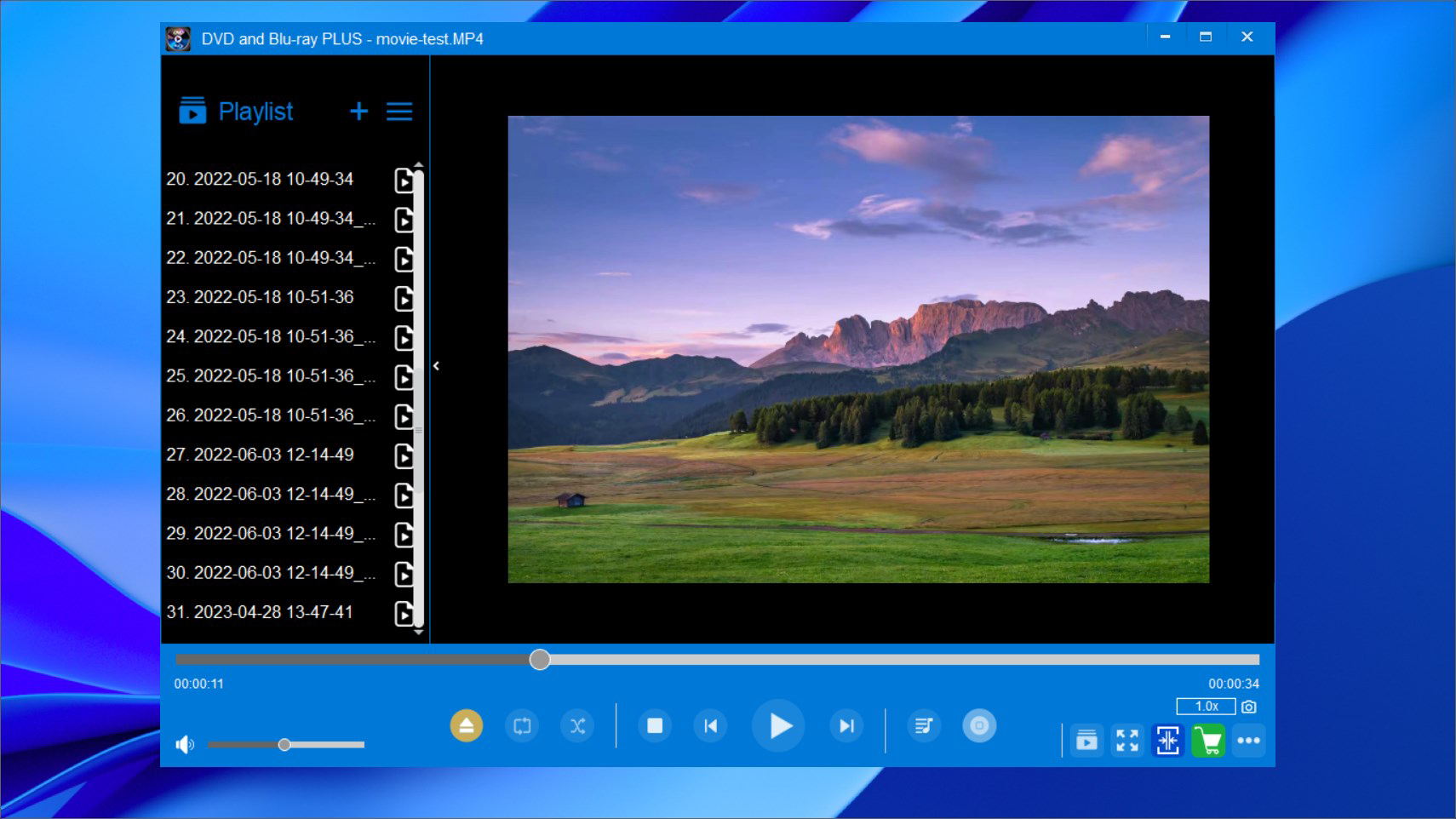
- User-Friendly Interface: The app features an intuitive layout with clear navigation and accessible controls, allowing users of all skill levels to operate it with minimal learning. This design promotes ease of use during extended playback sessions.
- Playlist Feature: Users can create and manage custom playlists for audio files, enabling seamless music playback without interruptions. This functionality enhances the experience for listeners who enjoy curated audio sessions.
- Monthly Blu-ray Updates: The app refreshes its Blu-ray database on a monthly basis, ensuring compatibility with newly released discs and maintaining optimal playback performance. This regular update cycle supports long-term usability.
- Premium Features: A paid version offers a video compressor tool, allowing users to reduce file sizes for easier storage and sharing. This feature is ideal for optimizing media libraries on devices with limited space.
For example, a user with a collection of old VCDs and modern MKV files can use the app to play all content without switching applications. Similarly, music lovers can compile playlists of FLAC tracks for high-fidelity listening, while benefiting from the app’s stability and consistent performance.
Interface, UX & Performance
The interface of DVD and Blu-ray PLUS is designed with simplicity and functionality in mind. Navigation is straightforward, with clearly labeled buttons and logical menu organization. Visual elements are clean and uncluttered, minimizing distractions during playback. The app maintains a consistent layout across different media types, ensuring a predictable user experience whether playing a movie or a music album.
Although the developer did not list formal performance metrics, the app appears to run smoothly on standard Android devices, with responsive controls and minimal lag during playback. The user experience is enhanced by the app’s ability to handle high-resolution video files without noticeable buffering, even on mid-tier hardware. Stability during extended use has been reported positively in user feedback, suggesting reliable operation over long sessions.
Performance may vary slightly depending on device specifications, but the app’s lightweight size of 26.8 MB indicates efficient resource usage. The absence of excessive animations or background processes contributes to its overall responsiveness. Compatibility with various screen sizes and orientations ensures accessibility across different device types.
Platform Compatibility & Technical Requirements
DVD and Blu-ray PLUS is available exclusively on the Android platform. The current version is 2.0.1, with a file size of 26.8 MB. The app was released on March 26, 2023, and is priced at $4.99. While the developer did not specify minimum OS requirements, the app is designed to function on modern Android devices. Users are advised to ensure their device supports optical disc playback through external hardware, as the app itself does not include built-in disc drives.
Specific hardware compatibility details were not provided. The app’s functionality relies on external USB or OTG-connected drives for disc reading. Therefore, users must have compatible peripheral devices to fully utilize the disc playback features. The lightweight installation size suggests it can be installed on devices with limited storage space.
Pros and Cons
Pros
- Supports a wide range of video and audio formats, including DVD, Blu-ray, VCD, CD, AVI, MP4, MKV, and FLAC.
- Monthly updates to the Blu-ray data source ensure ongoing compatibility with new releases.
- Intuitive interface suitable for users of all experience levels.
- Includes a playlist feature for organized audio playback.
- Premium version offers a video compressor tool for file optimization.
Cons
- Requires external hardware for disc playback, which may not be accessible to all users.
- Price point of $4.99 may be considered high for a single-purpose media player.
- Developer did not disclose minimum OS or device compatibility details.
- No built-in disc drive functionality within the app.
- Limited information on technical specifications or performance benchmarks.
FAQ
Is DVD and Blu-ray PLUS free to download?
The app is available for a one-time purchase of $4.99. There is no free version or trial period mentioned.
Can I play DVDs and Blu-rays directly on my Android phone?
Direct playback requires an external disc drive connected via USB or OTG. The app itself does not include a built-in disc drive.
Does the app support high-resolution video playback?
Yes, the app supports high-resolution video formats such as MKV and MP4, though actual playback quality depends on the device’s hardware capabilities.
How often are the Blu-ray updates released?
The app receives monthly updates to its Blu-ray data source to maintain compatibility with new disc releases.
Is the video compressor tool available in the free version?
No, the video compressor tool is only available in the premium version of the app.
Final Thoughts
DVD and Blu-ray PLUS stands out as a powerful, format-agnostic media player tailored for users who value versatility and reliability. Its broad support for physical and digital media, combined with regular updates and a clean interface, makes it a strong contender in the Android media player space. While the need for external hardware limits its accessibility, the app delivers a seamless experience for those with compatible setups. The inclusion of a playlist feature and a video compressor in the premium tier adds significant value for advanced users.
For individuals managing diverse media collections—whether from physical discs or digital files—this app offers a unified solution that minimizes friction. Its commitment to ongoing updates and user-centric design reflects a thoughtful approach to long-term usability. If you're seeking a dependable tool for playing DVDs, Blu-rays, and a wide range of media formats, DVD and Blu-ray PLUS is a worthy investment.
Download DVD and Blu-ray PLUS now


